
Holiday Countdown w/Recurring Calendar Events
A calendar of U.S. Holidays combined with your own schedule of recurring events and tasks. Holiday descriptions, custom notes, import birthdays, split-screen view, change background. Receive background alert notifications. Select colors, icons, recurring options, expiration time, and more.

(12/17/17) iOS11/iPhone X support coming mid Jan 2018.
Features:
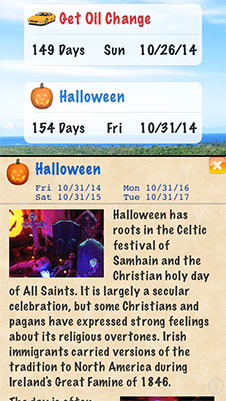
- See the DATES, DAY OF THE WEEK, ICON, and NUMBER OF DAYS for the next 29 UPCOMING U.S. HOLIDAYS in a scrolling list above a background picture of Kauai.
- Receive a background notification alert each day that an event is due. Select the time of day for your daily alerts, alert sound, and more. Receive an alert for just today's events that are due or today's and tomorrow's without the app active.
- View the DESCRIPTION, HISTORY, IMAGES and FUTURE DATES of each holiday in a scrolling split-screen details view.
- Use PINCH GESTURES to change the size of the text and pictures in the details view.
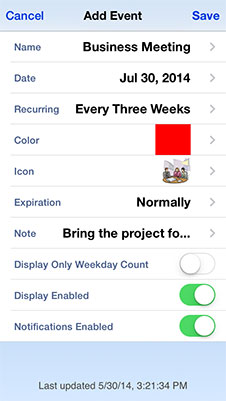
- Add, edit, and delete up to 300 CUSTOM EVENTS AND TASKS.
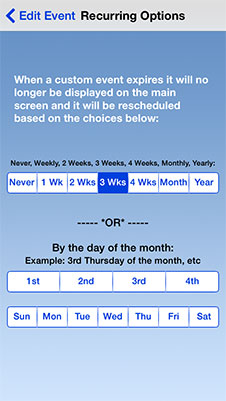
- Custom events can be set as RECURRING weekly, every 2 weeks, 3 weeks, 4 weeks, monthly, yearly or by day of the month ("Third thursday of the month", etc).
- Create your own NOTES for each custom event or task displayed in an animated pop-up details window.
- Show how many days since an event in the past by changing EXPIRATION OPTIONS: Normal, after 1 day, 3 days, 1 week, 2 weeks, manually (How long it remains on the main screen after the due date).
- IMPORT BIRTHDAYS and their corresponding NOTES from your ADDRESS BOOK.
- IMPORT / EXPORT to the built-in calendar (Requires iOS 5.0+).
- For each custom event / task select from 94 UNIQUE ICONS, 16 COLORS, TITLE, NOTE, DATE and RECURRING STATUS.
- Change the BACKGROUND IMAGE (Retina display support) to one from your photo album, saved photos or iPhone camera.
- Select one of FOUR FONTS for display, change the VISUAL TRANSPARENCY (to see more or less of the background image), and enable/disable SOUNDS or the display of ICONS.
- DATE ENTRY view shows the day of the week and number of days in real-time.
- Selectively ENABLE / DISABLE the display of individual holidays or custom events.
- The display format of the dates will change depending on the device’s international region format settings.
- Selectively only show the number of weekdays until a particular event.
- Choose your DEFAULT ICON and DEFAULT COLOR to be used to represent new custom events.
- iOS7 and iPhone 5 support.
ADDITIONAL DETAILS:
- Customized events / tasks are great for tracking a repeating event such as a birthday, anniversary, or meeting as well as an appointment, wedding, vacation, dinner, sporting event, doctor’s visit, graduation, party and more.
- Use the program as a task manager for “to do” tasks such as going to the store, making a phone call, or doing an errand. Phone numbers entered in the event notes can be clicked on to dial on the iPhone.
- The closest holiday or custom event is always displayed first in a scrolling sorted list. By default when the date of a custom event has passed, it will display "expired" on the selection screens and will no longer display on the main screen.
- When importing birthdays from your contacts, choose to import only new entries or also update previously imported birthdays. If the birthday has a note, it will be imported as well.
- Increase the size of pictures or text in the pop-up details window using pinch gestures.
- Traditional Holidays include New Year's Day, Martin Luther King Jr Day, Lincoln's Birthday, Valentine's Day, Presidents Day, St Patrick's Day, Easter, Mother's Day, Memorial Day, Father's Day, 4th of July, Labor Day, Columbus Day, Halloween, Veterans Day, Thanksgiving and Christmas. Included Jewish holidays: Purim, Pesach, Yom Kippur, Rosh Hashanah, and Hanukkah.
- Special Events include Spring, Summer, Fall, Winter, Daylight Saving Time start and end dates and Flag Day.
Testimonials from the iTunes App store:
"This is a very enjoyable way to countdown your favorite holidays! I like I can customize the background and watch the days countdown." - Lisa Norwood
"I love how you can personalize it with your own background! Fonts, colors and icons are nice too!" - Wingy33
"The custom event feature is awesome and having the origins for traditional holidays available is a great touch!" - Been blessed
"The graphics are great, best holiday calender that I have tried. " - Hezmana
"Extremely Useful and It's Not Just for Holidays " - luv2tri
"Practical and useful and accurate. It's fun to use" - irabg2428
"This app does exactly what it is advertised to do, and does it very well." - HBLguy
"Very user friendly and excellent design." - Agenthmy
"Love it, easy to use." - Skye watcher
"This app is really helpful. It didn't just tell u how many days to the closest holiday but all of them." - Janetellenlawton123
"A great tool for on-the-go and for those who have plans on a certain holiday/s. Nice Job!" - Benz08
"Fantastic App! Thanks for keeping it updated!" - JohnnieJim
"I like this application. It does what it says and does it well." - Kracz_girl
"Buy it before they figure out how good it is and raise the price." - Saratoga7
"Easy to use and convenient." - Ncnesmith
"Simply the best." - appluvr66
"Awesome...Very useful." - Patton 4
Video demo of Holiday Countdown, V2.3 (The latest version adds more features)


